The complete guide to AI operating systems: what they are, how they work, and why they matter
A practical guide to the operating layer that connects AI models, memory, tools, projects, people, agents, and permissions across work and everyday life
David Daniel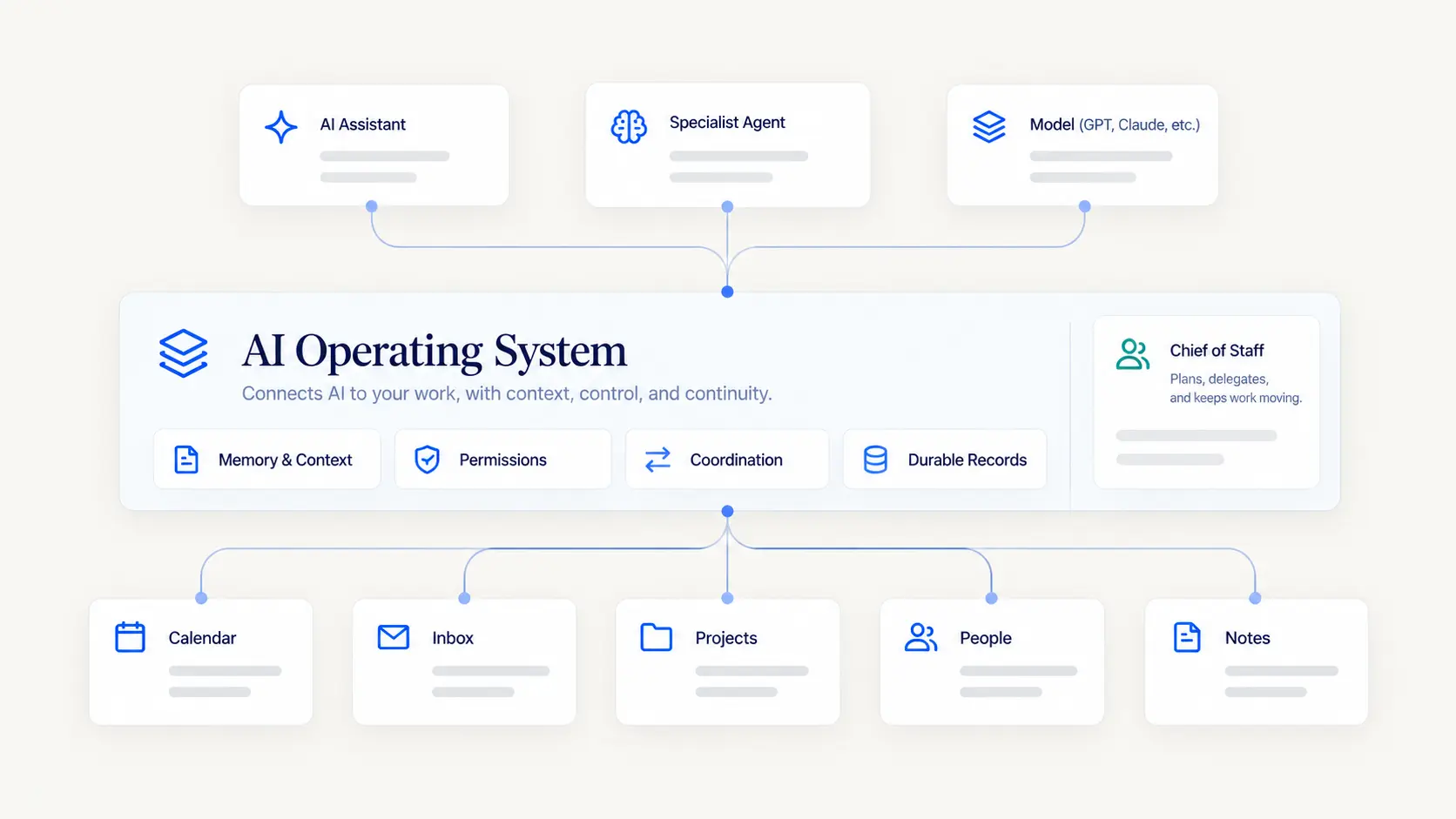
An AI operating system is the layer that helps AI move from isolated conversations into coordinated, ongoing work.
Your life does not happen inside one app. Work may live across email, calendars, project tools, documents, meetings, messages, and a CRM. Everyday life adds family schedules, household responsibilities, travel, goals, relationships, and the things you are trying not to forget.
A useful AI operating system sits above those fragments. It connects models, memory, tools, accounts, projects, people, agents, permissions, and ongoing context so AI can understand what is happening, help determine what matters, and take appropriate action without making you rebuild the context every time.
That is the category EverydayOS is designed around. The intelligence that helps run your work and everyday life should live in an operating layer rather than inside one conversation or one model provider.
A deeper walkthrough
Why the idea of an AI operating system matters
Most people do not have one AI problem. They have a coordination problem.
Email lives in one place. Calendars live somewhere else. Projects are spread across task managers, notes, documents, CRM systems, text messages, meetings, and memory. A person may use several AI tools, but each one usually sees only a slice of the situation.
That creates a strange result: AI can be remarkably capable while the person using it still has to act as the integration layer. You copy context from one place to another, remind the AI what happened last week, explain which business an account belongs to, and manually move work between systems.
An AI operating system addresses a different question: what if the system, rather than a single model or chat window, held the durable context needed to help operate your work and life?
What is an AI operating system?
An AI operating system is a persistent coordination and governance layer that connects AI models to memory, tools, data, projects, people, and agents so work can continue across time, applications, and conversations.
Persistent means the system should not behave as though every conversation is the first conversation. Projects, commitments, preferences, decisions, relationships, goals, and prior work can remain available when they are still relevant.
Coordinated means the system understands how those pieces relate. A meeting may connect to a project, the project to a client, the client to an outstanding proposal, and the proposal to a commitment that affects the calendar.
Governed means the system distinguishes between what an agent can see, what it can suggest, what it can prepare, what requires approval, and what it has explicit authority to do automatically.
An AI operating system is not your computer operating system
The name can be confusing because traditional operating systems manage hardware and software resources on a device. Windows, macOS, Linux, iOS, and Android coordinate processors, memory, storage, files, applications, and hardware access.
An AI operating system works at a different layer. It coordinates resources such as models, context, long-term memory, tools, connected accounts, specialized agents, projects, tasks, goals, commitments, people, permissions, approvals, time, money, attention, and compute.
The analogy is useful because both kinds of operating systems coordinate resources and enforce boundaries. But an AI operating system does not need to replace the device operating system underneath it.
AI operating system vs. AI assistant
An AI assistant describes the relationship the user experiences. You ask for help. The assistant understands the request, answers questions, prepares work, and may take action on your behalf.
The operating system is the environment that makes that assistant more capable over time. It can hold durable context, connect tools, coordinate specialist agents, track ongoing work, and enforce the rules around what can happen.
At EverydayOS, we think of the assistant as the human-facing layer. The assistant does not need to personally contain every piece of memory, every integration, every specialist capability, and every permission rule.
Assistant = the relationship.
Operating system = the environment that makes the relationship durable and operational.
AI operating system vs. AI agent
An AI agent is an actor that pursues a goal or performs a role. A research agent might gather evidence. A project agent might track commitments and dependencies. A client-success agent might prepare follow-up.
The operating system coordinates those actors. It should know which agent owns the work, which context that agent is allowed to receive, which tools it can use, what actions require approval, how much resource it can consume, and how the result is recorded for the rest of the system.
A collection of individually capable agents can still create more management work for the user if nobody coordinates them. The operating layer is what turns specialized agents into a coherent organization rather than a folder full of bots.
AI operating system vs. automation
Automation is about making repeatable work happen with less manual effort. A workflow might watch for an event, apply a rule, move data, create a task, send a notification, or trigger another process.
An AI operating system can include automation, but it has a broader job. It also has to maintain context about changing priorities, exceptions, relationships, projects, and authority.
Traditional automation works best when the path is known. The operating system also needs to know when the situation no longer fits the rule and when a human or agent should make a judgment instead.
AI operating system vs. AI built into a specific app
AI inside a specific application can be genuinely useful. AI in a project-management tool can help with projects. AI in a CRM can help with contacts and pipelines. AI in email can help with messages.
The structural limitation is that each system is naturally centered on its own context. Your project tool does not automatically know the personal calendar conflict that changes your availability. Your CRM does not necessarily know the commitment made in a family conversation. Your email assistant may not know which project should become the week's priority.
An AI operating system sits above those applications so useful context can move across them without making every app the owner of your whole life.
The core layers of an AI operating system
A useful AI operating system needs more than a model and a set of integrations. Several layers work together.
- Models: the reasoning and generation engines used for different jobs.
- World model and memory: durable information about people, projects, commitments, decisions, preferences, goals, and history.
- Live state: what is happening now across calendars, inboxes, projects, connected tools, and other sources.
- Tools and accounts: the systems where information lives and actions happen.
- Agents: specialized roles that can own bounded responsibilities.
- Projects and commitments: the work that needs to move across time.
- Permissions and autonomy: rules for who or what can see, prepare, approve, and act.
- Orchestration: the layer that decides how all of these pieces work together.
The point is not architectural elegance for its own sake. Each layer exists because real work crosses boundaries that a single chat window cannot carry reliably.
Who does what: the org chart version
Once you have more than one AI helper, you run into the same problem every growing company runs into. Who is responsible for what, and who decides when two of them want different things?
The most useful way to think about it is the way you would think about hiring.
At the top is a chief of staff, and that person works for you. A good human chief of staff does not do all the work. They hold the whole picture, decide what actually needs to reach you, and make sure the things you agreed to actually happen. They know that Thursday looks open on paper but you are flying Friday morning. That is the role at the top of an AI operating system, and it belongs to you personally. It spans everything you are responsible for, including more than one business and the parts of your life that are not business at all.
Underneath, a big enough operation earns its own manager. If you run two companies, the second one does not need to know about the first one's payroll. It needs someone holding its own projects, its own client history, its own way of doing things. Same for a household. That role coordinates inside its own world, and your chief of staff is the one who sorts it out when two of them want your Tuesday.
Below that are the people with a specific job. Someone who owns the finance side. Someone who owns one big client end to end. Someone who just does the one thing they are very good at.
Here is the part that matters most, and it is the part most people get wrong. Reporting to someone does not mean seeing what they see. Your operations manager reports to you. That does not give them your personal bank account. The same has to be true here. Each role gets its own access, its own spending limit, its own list of things it must ask about first. If the structure quietly passes access downward, you have not built an organization. You have built one shared login with names on it.
That is the structure EverydayOS is built around, and the reason to understand it before you need it is that the rules which keep an organization safe have to be set while it is still small. Access handed out loosely when there are two roles is very hard to claw back when there are nine.
What should an AI operating system actually do for you?
The best test is not whether the system has an impressive architecture. It is whether it reduces the amount of coordination you personally have to carry.
A useful system should help you understand what deserves attention, prepare for important moments, surface commitments before they slip, connect information across tools, delegate repeatable work, and bring you back in when judgment is actually required.
For a solopreneur, that may mean more operating capacity without hiring a large support team. For a small business, it may mean clearer handoffs between people and agents. In everyday life, it may mean fewer open loops living only in your head.
The hardest part is not intelligence
The most difficult problems often appear after the model is already smart enough to do the task.
Which account should it use? Which version of a fact is current? Which project does this message belong to? Can this agent see personal context? Can it spend money? Is it allowed to send the email or only draft it? Who is responsible when two agents touch the same commitment?
These are operating-system questions. They are about identity, provenance, scope, permissions, shared state, and accountability. Better models help, but they do not remove the need for those structures.
The tradeoffs and risks
A more connected system can be more useful, but it also concentrates responsibility. Poorly designed memory can become intrusive. Broad permissions can create unnecessary risk. Too many agents can create more coordination work rather than less. Bad source handling can let stale or inferred information masquerade as fact.
The answer is not to avoid context or action altogether. It is to design them deliberately. Memory should be correctable and scoped. Permissions should distinguish reading from acting. Autonomy should expand by context rather than globally. Provenance should stay attached to important information.
The goal is useful coordination without ambient authority.
How to evaluate an AI operating system
If you are evaluating an AI operating system, look beyond the demo and ask how it handles the operating questions.
- Who owns the memory? Can the user's long-term context survive a change in model provider?
- Can it handle multiple accounts and scopes? Personal, household, business, client, and other identities should not collapse into one undifferentiated pool.
- How are permissions represented? Reading, drafting, approving, and acting should not be treated as the same authority.
- Can specialized agents share context without sharing everything?
- Does it have a native concept of projects, commitments, people, and decisions?
- Can it explain where important information came from?
- Does it reduce management overhead? A system that creates more dashboards, exceptions, and supervision is not operating leverage.
Why EverydayOS is designed this way
EverydayOS is designed around a user-owned world model, model independence, multi-account support, native projects, specialized agents, contextual autonomy, and explicit permission boundaries.
The core belief is that your operating context should belong to the system you control rather than to whichever model provider or application happens to hold the current conversation. Models can change. Tools can change. Your projects, relationships, commitments, decisions, and history should remain coherent.
It is also why work and everyday life are both first-class. They should be able to coordinate when necessary without pretending they are the same scope or exposing information more broadly than the task requires.
What that is worth, in practice, is that the effort you put in stops being disposable. Every time you explain your business to a new AI tool, you are rebuilding something you already built once. An operating layer is what turns that into a one-time cost.
Your action plan
You do not need to build an entire AI operating system at once. Start by identifying where coordination is already breaking down.
- List the systems where important context lives. Email, calendars, projects, CRM, files, notes, meetings, household systems, and the things still living only in your head.
- Identify the context you repeatedly reconstruct. Those repetitions are clues that durable memory or shared state would help.
- Separate access from authority. Decide what AI may read, what it may prepare, what requires approval, and what may become a trusted repeatable.
- Define a few real roles. Give agents jobs with clear boundaries rather than names without responsibility.
- Measure attention returned. The system should make your work and life easier to operate, not create another layer you have to manage.
If you are trying to decide where to start, the AI Assistant, AI Agents, AI Memory & Context, and AI Automation topics each explore one part of this operating layer in more depth.
Put AI to work around what matters most
Join early access to EverydayOS and help shape an AI operating system that can coordinate the essential things across your work and everyday life, without making you manage another pile of disconnected AI tools.
Join Early Access