What belongs in an AI operating system?
The pieces that actually matter, explained the way you would explain a team
David Daniel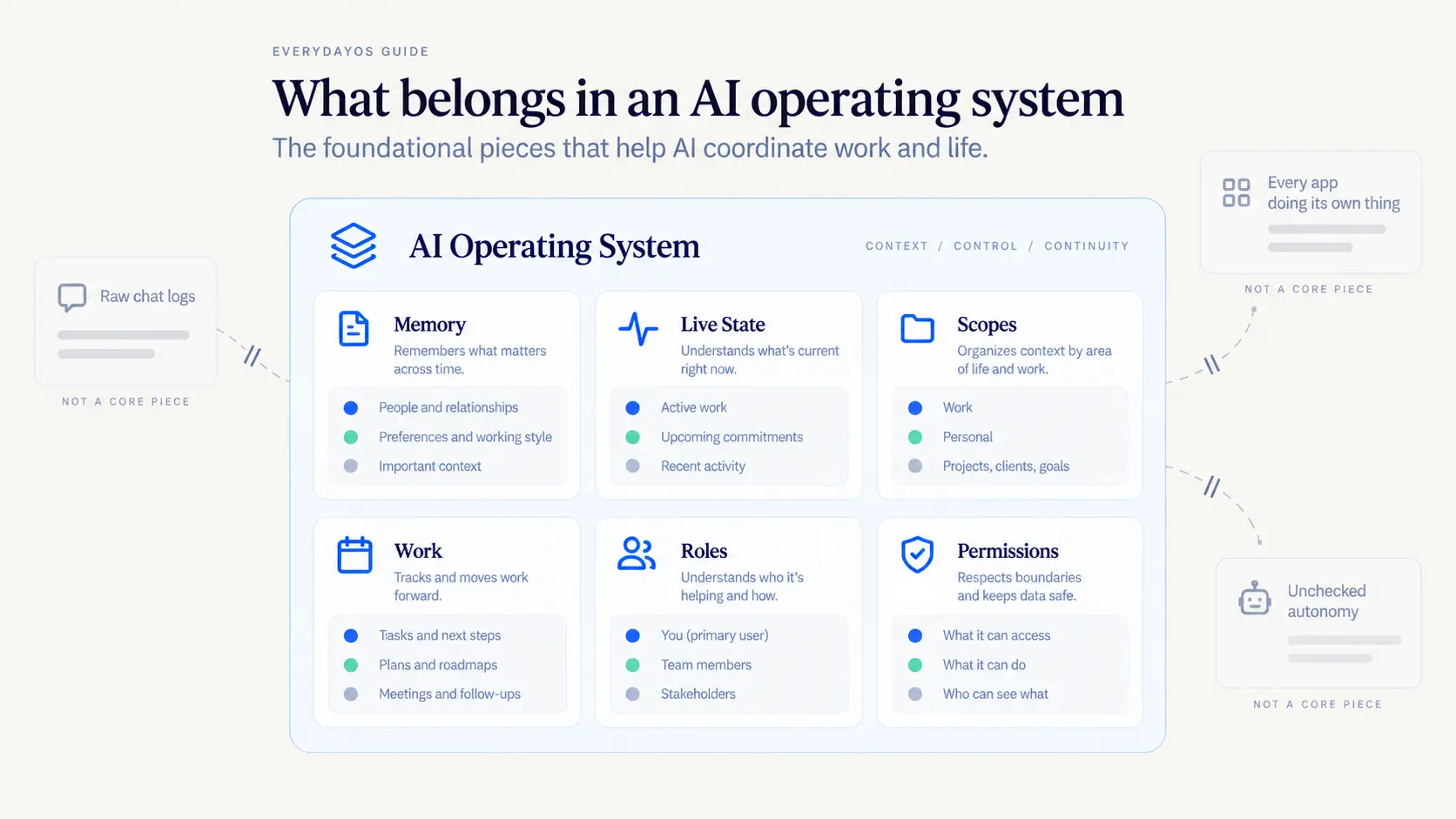
The easiest way to understand what goes into an AI operating system is to think about what you would need if you were hiring people instead.
You would need them to know the history of the business. You would need them to know what is going on this week. You would need to give each of them the right level of access, which is not the same for everyone. You would need somewhere for the work to live so it does not just exist in somebody's head. And you would need to be clear about who does what.
An AI operating system needs the same five things. The rest is detail.
There is one test worth keeping in mind as you read. Does this piece answer a question that a single chat with an AI cannot answer? If it does, it belongs in the operating layer. If it does not, it is just a feature.
A deeper walkthrough
Think of it as staffing
Picture bringing on a really capable assistant. Not a temp for the afternoon. Someone you expect to still be there in two years.
On day one they know nothing. Every task means explaining the background. Which client is this? What did we decide last time? Why do we not use that vendor anymore?
Six months later, that stops. They know the history. They know that when this particular client emails on a Friday it usually means a problem. They know you do not schedule anything before ten on Mondays. They stopped asking because they already know.
That gap between day one and month six is exactly what an AI operating system is built to close, and close faster than any employee would. Almost everything in it exists to stop you from being the person who has to explain the business over and over.
Someone has to remember
The first piece is memory, and it is the one most people imagine doing more than it should.
The instinct is to have it remember everything. That sounds obviously good and it is not, for the same reason you would not want an employee who treats everything they ever overheard as equally true.
Think about how you actually hold information about your own business. Some of it is solid. The contract says net 30. That is a fact, it is written down, you can point to it. Some of it is a read. This client seems frustrated lately. That is worth knowing and it is not the same kind of thing at all.
Good AI memory keeps those separate. It knows the difference between what you told it, what it saw in your calendar, and what it worked out on its own. So when it tells you something, you can tell how much weight to put on it.
It also has to forget. Projects end. People leave. That vendor you stopped using two years ago should not keep coming up. A system that only adds and never retires gets more confident and less useful at the same time.
The practical test: if forgetting something would make a future decision worse, it is worth remembering. If not, it is clutter.
Someone has to know what is happening today
Memory is what stays true. That is different from what is true right now.
A good assistant knows both. They know your general policy on Friday meetings, and they know that this particular Friday you are at a conference.
Systems that blur these two produce a specific kind of annoying mistake. They answer a question about this week using something they learned in March, with no hint that things might have moved.
Keeping them separate also settles a question that matters more than it sounds: who is right? Your calendar app is right about your calendar. The operating layer's job is to read it correctly and understand what it means for you, not to keep a second version that slowly drifts out of date.
Keeping your worlds straight
Almost nobody has one of anything.
You have a work inbox and a personal one. Maybe two businesses. A shared family calendar. Client systems you can get into but do not own.
If a system assumes you are one person with one account, all of that collapses into one pile. And the way that goes wrong is not subtle. It is a client's information showing up where it should not, or something personal surfacing in a work context.
You already manage this instinctively. Your bookkeeper sees one business's books, not both. Your assistant sees your work calendar and knows your personal one exists without reading the details. Keeping those boundaries is not an advanced feature. It is the baseline.
EverydayOS is built on that boundary rather than bolting it on afterwards, because very little above it is safe without it.
Work needs somewhere to live
Here is a question worth sitting with: where does a commitment live?
Say you are on a call. You agree to get a revised proposal over by Thursday. That depends on a number from your bookkeeper. And you are traveling Wednesday.
Where does that live? It is not really a task. It is not a calendar event, though it touches two. It is not an email, though it came from one. In most businesses the honest answer is that it lives in your head, and you spend a bit of energy every day making sure you do not drop it.
That is the gap. Some work belongs to no single app, so it ends up belonging to you.
An operating layer gives that work an actual home. What is the outcome, who is involved, what was decided, what is outstanding, what is stuck. It has to cover personal life too, because trying to run a household inside a work project tool is how people quietly abandon the whole system.
There is a genuine tradeoff here. Once the operating layer holds its own version of the work, it can drift from the tools around it. The way to keep that honest is to let each app stay the authority on what it owns, and only take something over on purpose.
Write the job description first
When people first get access to AI agents, they tend to make a lot of them. One for email. One for research. One for social. One for scheduling.
It feels productive. What you have actually done is hire nine people without writing a single job description, and now you manage nine people.
A useful role answers the same questions you would answer before making a real hire. What are you responsible for? What do you need access to? What can you decide on your own? When do you come to me first?
If you cannot answer those, the role is not ready to exist. That is as true for AI as it is for people.
One more thing that sounds technical and is not: it helps when the system treats people and AI the same way. If a task can be owned by your operations manager or by an AI agent, and handing it over works identically either way, you have one process. If AI work lives somewhere separate, you have two of everything forever.
That is how EverydayOS is designed. Roles with defined responsibility, and handoffs that behave the same whether the work goes to a person or to an agent.
Access is not permission
This is the one worth slowing down for, because it is where most people's instincts are wrong.
Think about your office. The new hire gets a key to the building. That does not mean they can sign contracts. Your assistant can open your mail. That does not mean they reply to your biggest client as you. Your bookkeeper sees every invoice and cannot move money without you.
You already run four different levels there without thinking about it:
- What they can see. Which drawer, which folder, which inbox.
- What they can get ready. Draft it, prepare it, put it on your desk.
- What you have to sign off on. Approval for that specific thing, each time.
- What they just handle. The routine stuff you stopped checking a year ago.
AI needs exactly these four, and the common mistake is skipping straight from the first to the last. Giving something access to your inbox is not the same as giving it permission to speak for you.
It also has to work the way trust works with a person. It grows in one area at a time. You might trust someone to send routine confirmations months before you would let them quote a price. And it has to be something you grant, not something the system decides it has earned. A system that widens its own authority because it has been doing well has not earned trust. It has removed a step.
EverydayOS is built with these four as separate settings rather than one switch, so the system can become genuinely useful without ever holding more authority than you meant to give it.
What does not belong
Three things get pulled in that should stay out.
Work your existing tools already do well. If your CRM is good at being a CRM, the operating layer should work with it, not rebuild it badly.
Agents with no actual job. Same as hiring someone because you had budget. Now you have another person to manage.
Information saved just because it was there. More storage is not more helpful. Past a point it just makes everything harder to find, including for the AI.
Where to start if you are building toward this
Take them in the order of how much it hurts when they are missing.
- Keeping your accounts and worlds straight. Get this wrong and nothing above it is safe.
- The four levels of access. Get this wrong and the more useful it gets, the more nervous you should be.
- Memory you can trust and correct. Can it tell you where something came from? Can you fix it when it is wrong?
- Somewhere for work to live. Especially work that spans several tools.
- Real roles. Only once there is something worth delegating.
Most systems that demo beautifully and frustrate in practice have skipped one of the first three.
Why EverydayOS works this way
None of this is a feature list we assembled because it sounded impressive. It is the smallest set of things we could find that lets AI genuinely help run a business without either losing track of what is going on or quietly getting more authority than anyone meant to give it.
The thing underneath all of it: this should belong to you. The AI models will keep changing. Your tools will change. What you know about your clients, your projects, your decisions and your history should survive all of that instead of living inside whoever built this year's best chatbot.
That is also what makes the difference compound. A tool you have to re-explain yourself to is worth about the same in year three as it was on day one. Something built on an operating layer is worth more every month, because the understanding accumulates instead of resetting.
If you want the full category picture, read The complete guide to AI operating systems. If you are still deciding whether you need one at all, read Why would someone need an AI operating system?
Put AI to work around what matters most
Join early access to EverydayOS and help shape an AI operating system that can coordinate the essential things across your work and everyday life, without making you manage another pile of disconnected AI tools.
Join Early Access